

R4R provide basic WML Tutorials concept with WML Examples .Through R4R you can develop WML programming concept. R4R provide WML Interview Questions with answers.R4R provide WML Languages study materials in easy way.
Wireless Markup Language (WML) is a markup language based on Extensible Markup Language (XML) and was developed specifically for content and user interface for mobile device. WML is a tag-based markup language designed after the model of HTML for Web content. The designers of WML (and its companion scripting language, WMLScript) created an environment that demands less memory and processing power from browsers than HTML and JavaScript
WML also includes features that tailor it for the relatively small display sizes of today's wireless devices .WML and HTML differ in significant ways. Although WML strips some features from HTML and co-opts others, WML also incorporates some powerful programming constructs not found in HTML like variables, tasks, and events. WML implements a stricter tag syntax than HTML and includes a DTD for use with XML parsers
and displayed properly by cell phones with a small screen where standard HTML pages (the markup language used on most regular wide web pages) would produce an bad output and might even be unviewable.
Wireless Markup Language (WML) has been popular since it was born in 1999. . WML was developed for WAP with limited connection bandwidth and smal screen of mobile devices. It's different than HTML since its programming is more complicated than HTML. For this reason, some carriers and phone manufacturers inside the WAP forum (now integrated with Open Mobile Alliance) felt that the wireless mark-up should evolve in the direction of HTML to make developers' lives easier (and development more economical).
Mobile devices has the following characteristics that makes Internet browsing difficult:
- Small display with extremely low resolution
- The input mechanism is limited by numeric keypad.
- The computational power is low and the built-in memory is limited, usually less than 100K.
- The mobile network bandwidth is extremely low and is of high latency.
- Offering text and image (wbmp) support.
- Grouping content cards into decks. Typically, a WML card is a screen of information and a deck is a unit of transmission
- between mobile device and the web server.
- Offering support for managing navigation and command execution.
The Web request from the phone is first served by the Gateway Server, which generally is provided as part of services from mobile operator's network. However, it is possible to set up a private gateway. The gateway server translates mobile phone requests (WAP) into HTTP requests and sends them to Web server. The Web server processes the request, and sends WML to gateway server, which in turn sends the WML to phone in the binary compressed WML format.
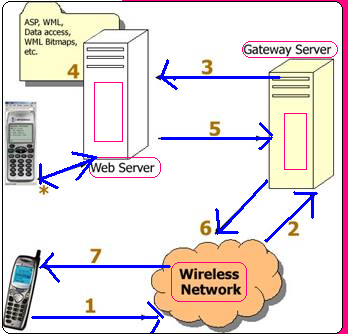
- Mobile phone sends a Web request
- Wireless Network provider forwards the request to gateway server.
- Gateway server sends request to Web server in HTTP format.
- Web server accesses data, runs ASP/JSP/CGI Script/… pages and generates WML.
- Web server sends WML back to gateway server as HTTP Response.
- Gateway server binary compresses WML and sends that to cellular phone as WAP response.
- Cell phone displays the content.
WML is an XML vocabulary that consists of a deck, and a deck contains multiple cards. Here is how a "First pro" WML document will look like:
<?xml version="1.0"
?>

<!DOCTYPE wml PUBLIC "
-//WAPFORUM//DTD WML 1.1//EN" "http://www.wapforum.org/DTD/WML_1.1.xml"
>

<wml>

  <card id="card1"

  title="Greeting">

    <p align="center"
    >


      This is The first Wml Program!

    </p>

    <p align="center"
    >

       From PerfectXML

    </p>

  </card>

</wml>
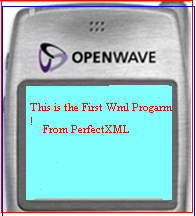
The document starts with the standard XML declaration. The next line specifies that the document adheres to WML version 1.1 deck. The deck has wml element, which can have one or more card element, and each card element can have one or more p elements. If you open this WML file in WAP emulators, here is what you should see
WAP homepages are not very different from HTML homepages. The markup language used for WAP is WML (Wireless Markup Language). WML uses tags - just like HTML - but the syntax is stricter and conforms to the XML 1.0 standard. WML pages have the extension. WML, just like HTML pages have the extension.
WML is mostly about text. Tags that would slow down the communication with handheld devices are not a part of the WML
standard. The use of tables and images is strongly restricted, Since WML is an XML application, all tags are case sensitive
(
- WML is straightforward and an easy to learn markup language.
- WML is part of the WAP standard and its use is required.
- WML allows the developer to create the user interface which will be displayed on the screen of the mobile device.
- The type of content displayed on the mobile device screen such as text, links, images, data entry fields and selection lists are all easily created by the developer using the appropriate WML tag.
- WML and WMLScript are supported by the WTA (Wireless Telephony Application) Libraries. These public libraries allow the use to build into the application easy access to telephony functionality.
- WAP devices such as WAP phones will not accept large decks (1.4K for some WAP phones).
- Most of the phones not only have very little memory and slow simple processors, but they also have small screens and tiny keypads.
- You will never be able to create a successful WAP service if your WML pages are overloaded with fancy images and lots of text information